Introduction
Artificial intelligence is rapidly becoming part of everyday digital life.
AI systems can now help us write emails, analyze documents, summarize meetings, search company knowledge, generate software, manage projects, analyze financial information, and automate repetitive work.
The productivity benefits are enormous.
But the expansion of AI into our daily workflows introduces a fundamental security question:
How much of our information should AI actually be allowed to access?
The answer should not be “everything.”
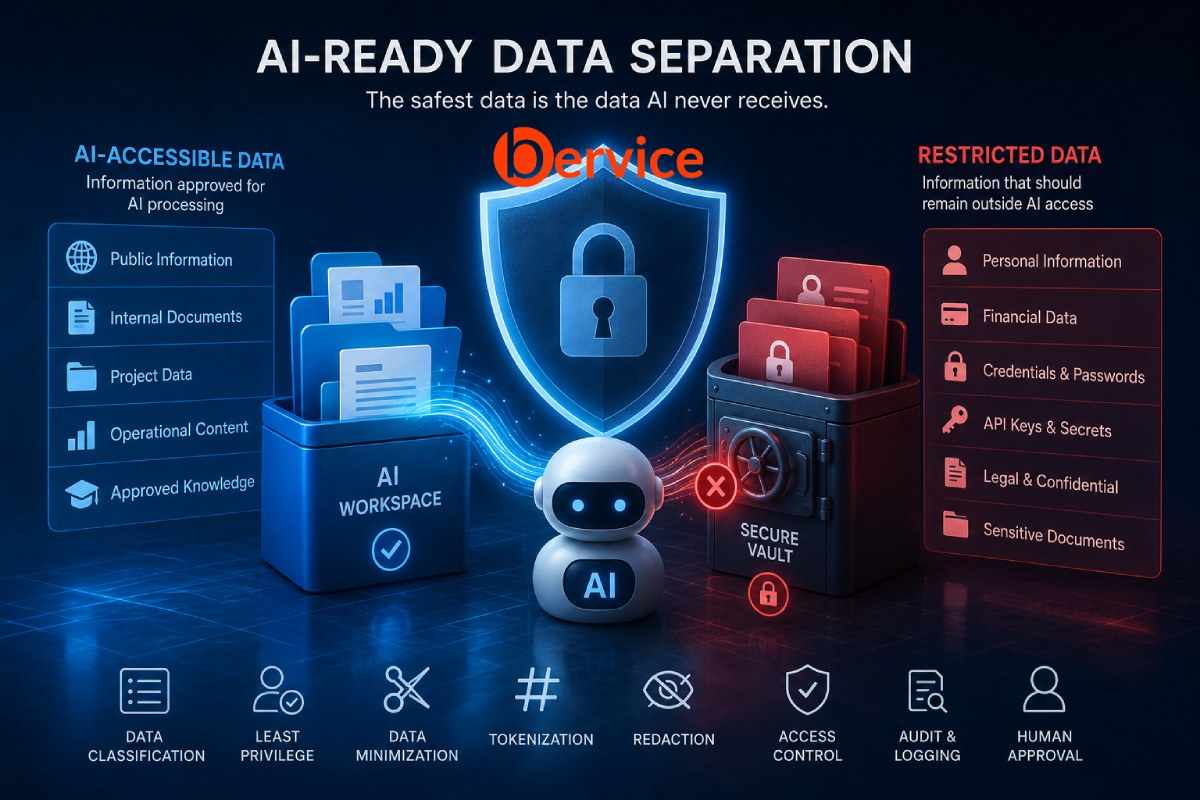
The safer approach is to design digital environments where ordinary operational data can benefit from AI, while personal, confidential, security-critical, and highly sensitive information remains separated behind stronger boundaries.
This concept can be described as AI-Aware Data Separation.
Instead of trying to make every AI system perfectly trustworthy, organizations and individuals can design their information architecture so that AI simply never receives certain categories of information in the first place.
This distinction is becoming increasingly important because sensitive information disclosure is already recognized as a major security risk for large language model applications. OWASP identifies personal information, financial information, confidential business data, security credentials, legal documents, and proprietary information among the categories that can be exposed when AI systems are given inappropriate access.
The security principle is simple:
The safest confidential data is often the data the AI never receives.
1. The New Data Security Problem
Traditional cybersecurity was largely built around a relatively clear model.
Organizations had:
Users
Applications
Databases
Servers
Administrators
Security systems determined which users could access which resources.
AI changes this architecture.
An AI assistant may potentially interact with:
- emails
- documents
- cloud storage
- source code
- databases
- calendars
- customer information
- internal communication
- CRM systems
- APIs
- project management platforms
- financial systems
An AI agent can potentially go even further by taking actions across these systems.
This creates a new intermediary between humans and information.
Instead of:
Human → Data
we increasingly have:
Human → AI → Data
That additional layer creates another security boundary that must be controlled.
Giving an employee permission to read a document does not automatically mean every AI system acting for that employee should receive the same document.
This distinction will become increasingly important as AI agents become more deeply integrated into operating systems and enterprise software.
2. Not All Data Should Be Treated Equally
One of the biggest mistakes in AI security is treating all information as if it belongs to the same security category.
Consider the difference between these pieces of information:
Meeting time:
Tuesday at 10:00 AM
Project information:
The engineering prototype should be completed next month.
Confidential information:
The unreleased product architecture.
Highly sensitive information:
A database password or private encryption key.
They clearly do not represent the same level of risk.
A practical architecture therefore begins with data classification.
A simple model could contain four levels.
Level 1: Public
Information that can safely be publicly disclosed.
Examples:
Marketing materials
Published articles
Public documentation
Product descriptions
Public website content
AI access can generally be permitted.
Level 2: Internal
Normal operational information that should remain within an organization but does not create catastrophic risk if accidentally exposed.
Examples:
Internal meeting notes
Project schedules
Routine communications
Internal procedures
Non-sensitive reports
AI access may be permitted under appropriate controls.
Level 3: Confidential
Information where unauthorized disclosure could cause significant personal, commercial, legal, or operational harm.
Examples:
Customer records
Employee information
Unreleased product designs
Contracts
Financial information
Source code
Business strategy
Internal research
AI access should be restricted and explicitly justified.
Level 4: Restricted
The organization’s most sensitive information.
Examples:
Passwords
Private encryption keys
Authentication secrets
API credentials
Highly sensitive personal records
Master financial credentials
Critical infrastructure credentials
Security recovery information
AI systems should normally have no direct access to this category.
Classification is not merely organizational housekeeping. Modern enterprise security systems increasingly combine classification with DLP controls specifically designed to prevent sensitive content from being processed or transferred through AI applications.
3. Create an AI Data Boundary
Once information has been classified, the next step is architectural separation.
Imagine an organization’s information environment as two broad zones.
AI-Accessible Zone
Contains information approved for AI processing.
Examples:
/AI-Workspace
    /Public
    /Operations
    /Projects
    /Approved-Documents
    /AI-Knowledge
AI tools can search, summarize, analyze, and process information within this environment according to their permissions.
Then create a separate environment:
/Restricted
    /Credentials
    /Legal-Confidential
    /Finance
    /Personal
    /Security
    /Executive
The critical difference is that the second environment is not simply hidden from the AI through instructions.
It should be technically inaccessible.
This matters because instructions such as:
“Do not access confidential files.”
are behavioral restrictions.
Permissions are security controls.
OWASP specifically warns against relying on prompts as a security mechanism and recommends keeping sensitive information outside systems directly accessible to the model.
4. Separate Personal and Professional Digital Identities
Individuals can apply the same principle.
Many people currently mix their entire digital lives inside the same ecosystem.
One email account may contain:
work correspondence,
banking notifications,
family conversations,
password resets,
medical documents,
shopping receipts,
contracts,
travel documents,
and personal photographs.
Connecting an AI assistant to that environment creates an unnecessarily large information surface.
A better architecture separates identities.
For example:
Professional Identity
work@email
work cloud storage
professional calendar
project documents
company communication
Personal Identity
personal@email
personal cloud storage
family documents
photos
personal communication
Sensitive Identity
financial records
identity documents
recovery information
legal documents
security credentials
The AI assistant could potentially operate within the professional environment while having no access to the sensitive environment.
This reduces the consequences of mistakes, compromised accounts, excessive permissions, and incorrectly configured integrations.
5. Use Separate Accounts and Storage Environments
Folders alone are useful organizational tools, but they are not always strong security boundaries.
For important information, stronger separation may require:
- Separate accounts
- Separate storage locations
- Separate permission groups
- Separate encrypted containers
- Separate cloud environments
- Separate devices or virtual environments for extremely sensitive operations
For example, instead of storing everything in one cloud drive and telling the AI which folders not to read, an organization could create an AI-approved repository containing only documents that have passed classification.
Conceptually:
PRIMARY DATA
     |
     | Classification
     |
     +----------------------+
     |                      |
AI APPROVED             RESTRICTED
     |                      |
AI Tools               Human Access
     |                      |
Automation             Strong Controls
The architecture itself enforces the boundary.
6. Apply the Principle of Least Privilege to AI
One of cybersecurity’s oldest principles becomes even more important with AI:
Least Privilege.
Every user, application, and AI agent should receive only the minimum permissions necessary to perform its task.
OWASP recommends strict access controls and limiting external data sources available to LLM applications.
An AI assistant that summarizes meetings probably does not need access to payroll.
A coding assistant probably does not need access to customer identity documents.
A customer support agent probably does not need access to the entire corporate drive.
A scheduling agent does not need access to private financial documents.
Instead of asking:
“What can this AI access?”
organizations should ask:
“What is the absolute minimum information this AI requires to perform this specific task?”
This produces a dramatically smaller attack surface.
7. Data Minimization Before AI Processing
Sometimes AI legitimately needs information from a sensitive dataset.
That still does not mean it needs the entire dataset.
Suppose an AI system needs to determine whether a customer qualifies for a service.
Instead of providing:
Name
Date of birth
Home address
Passport number
Income
Account number
Transaction history
Customer ID
the AI may only require:
Age range: 25-34
Eligibility: Yes
Risk category: Low
Customer ID: C10482
This is data minimization.
NIST describes data minimization as providing only the information required for a function rather than all information available about an individual.
This principle should become fundamental to AI architecture.
AI should receive answers whenever possible, not entire databases.
8. Replace Real Identity with Tokens
Another powerful technique is tokenization.
Instead of sending:
John Smith
[email protected]
+64...
123 Example Street
the AI system could receive:
CUSTOMER_84321
The real identity remains inside a protected system.
Only an authorized application can translate:
CUSTOMER_84321 → Real Person
The AI performs its task using the token.
This dramatically reduces unnecessary exposure of personally identifiable information.
OWASP specifically identifies tokenization and redaction as techniques for reducing sensitive information exposure in LLM workflows.
9. Redact Documents Before Sending Them to AI
Many AI tasks do not require complete documents.
Imagine asking AI to analyze a contract.
The AI may need:
payment terms,
termination conditions,
delivery obligations,
warranty provisions,
and liability clauses.
It may not need:
bank account numbers,
personal addresses,
signatures,
passport information,
employee identifiers,
or authentication information.
A preprocessing layer can automatically transform:
John Smith
Account: 123456789
Address: 25 Example Street
into:
[PERSON_01]
[BANK_ACCOUNT_REDACTED]
[ADDRESS_REDACTED]
The AI analyzes the useful information without receiving unnecessary sensitive data.
10. Introduce an AI Gateway
For larger organizations, one of the strongest approaches is placing a security layer between employees and external AI services.
Instead of:
Employee → AI Provider
the architecture becomes:
Employee → AI Security Gateway → AI Provider
The gateway can inspect information before it leaves the organization.
It may detect:
credit card numbers,
identity numbers,
API keys,
passwords,
private keys,
customer information,
confidential project names,
financial records,
classified documents,
or proprietary source code.
Depending on policy, it could:
Allow
Warn
Redact
Tokenize
Block
Require approval
This concept already exists in enterprise DLP systems. Microsoft, for example, documents controls that can warn or block users from sending sensitive information to third-party generative AI websites.
11. Separate AI Memory from Primary Data
Another important distinction involves AI memory.
Future assistants may remember:
preferences,
projects,
previous conversations,
work patterns,
relationships,
and frequently used information.
But AI memory should not become a copy of a user’s entire digital identity.
A safer model separates:
Operational Memory
from
Sensitive Records
For example, AI memory might contain:
Preferred report format
Current project name
Preferred programming language
Normal working hours
Frequently used tools
but should not automatically contain:
Passwords
Private keys
Bank credentials
Identity documents
Highly confidential correspondence
Medical records
Recovery codes
Memory should be selective rather than exhaustive.
12. Keep Secrets in Secret Management Systems
Credentials deserve their own architecture.
Passwords, API keys, database credentials, encryption keys, certificates, and authentication tokens should not be stored inside:
prompts,
AI memory,
chat histories,
documents used for RAG,
source code repositories,
or AI instructions.
OWASP explicitly recommends that credentials and other secrets not be embedded in system prompts.
Instead, secrets should remain inside dedicated systems such as:
Secret managers
Hardware security modules
Operating-system credential stores
Password managers
Secure key vaults
An AI agent may request an operation without ever seeing the underlying secret.
For example:
Instead of:
AI receives database password → connects to database
use:
AI requests approved database operation → trusted service authenticates → operation executes
The secret never enters the model’s context.
13. Separate Permission from Execution
This becomes especially important with AI agents.
Imagine an AI agent capable of sending emails, accessing cloud storage, making payments, modifying infrastructure, and managing databases.
Giving the AI unrestricted credentials would create enormous risk.
Instead, separate reasoning from authorization.
A safer architecture is:
AI proposes action
↓
Policy engine checks permission
↓
Human approval when required
↓
Trusted service executes
↓
AI receives limited result
The AI becomes the reasoning layer rather than the ultimate authority.
For high-risk actions, human approval should remain part of the security architecture.
14. Build AI-Specific Access Control
Traditional access control might say:
Pourya can access Finance.
An AI-aware system needs another question:
Can the AI acting for Pourya access Finance?
These permissions should not necessarily be identical.
An organization could therefore maintain separate permissions:
Human Permission
AI Permission
Automation Permission
External Application Permission
A person might have access to a confidential document while AI processing of that same document remains prohibited.
Enterprise security platforms are already moving in this direction. For example, DLP policies can prevent AI applications from processing documents carrying highly sensitive classification labels even when the user can access the document directly.
15. Protect Against the “Connected AI” Problem
The risk becomes larger when AI connects to multiple systems simultaneously.
Imagine an assistant connected to:
Email + Cloud Drive + CRM + Slack + Calendar + GitHub + Accounting.
Each integration may appear safe independently.
Together, however, they create a powerful information graph.
The AI may potentially correlate information across systems.
A calendar reveals meetings.
Email reveals conversations.
CRM reveals customers.
Cloud storage reveals documents.
Accounting reveals transactions.
Source control reveals technology.
Individually these datasets may seem ordinary.
Combined, they can reveal extremely sensitive business intelligence.
Therefore organizations should evaluate not only:
What information can this connector access?
but also:
What can the AI infer when several connectors are combined?
16. Data Segmentation Is More Important Than AI Prompts
There is a tempting security strategy:
Tell the AI:
“Never reveal confidential information.”
That is useful as an additional behavioral instruction.
But it should never be the primary security boundary.
OWASP warns that system prompts should not be treated as secrets or strong security controls because prompt injection and other attacks can alter or circumvent expected model behavior.
The stronger architecture is:
The AI cannot reveal information it never had permission to retrieve.
This is the fundamental difference between:
Behavioral Security
and
Architectural Security.
Good AI security requires both, but architectural restrictions should carry the greater responsibility.
17. The Three-Layer AI Privacy Model
A practical architecture can therefore be summarized in three layers.
Layer 1: AI Workspace
Designed for productivity.
Contains:
approved documents,
ordinary work data,
project information,
public information,
sanitized datasets,
and operational communication.
AI can operate relatively freely here.
Layer 2: Protected Workspace
Contains:
customer information,
financial reports,
contracts,
internal research,
source code,
and confidential company documents.
AI access is conditional, logged, minimized, and task-specific.
Layer 3: Restricted Vault
Contains:
credentials,
private keys,
identity documents,
critical financial access,
security recovery information,
and highly sensitive records.
AI has no direct access.
Only trusted software or authorized humans interact with this layer.
The architecture becomes:
               HUMAN
                 |
        +--------+--------+
        |                 |
        v                 v
 AI WORKSPACE      PROTECTED WORKSPACE
        |                 |
        v                 v
       AI          Controlled AI Access
                          |
                          v
                  RESTRICTED VAULT
                          |
                     NO DIRECT
                     AI ACCESS
This approach creates a meaningful security boundary between intelligence and authority.
18. Logging AI Data Access
Organizations should also be able to answer:
What information did the AI access?
AI activity should therefore generate auditable records.
For example:
AI Agent: Research Assistant
User: Employee 104
Resource: Project-Alpha/report.pdf
Action: Read
Time: 10:32
Purpose: Document summarization
Classification: Internal
Result: Allowed
For a restricted resource:
Resource: payroll-2026.xlsx
Classification: Confidential
AI Permission: Denied
Result: Blocked
Logging makes AI access observable rather than invisible.
It also allows security teams to identify unusual patterns.
19. The Zero-Knowledge Mindset for AI
Organizations should begin adopting a mindset similar to Zero Trust security.
Instead of assuming:
AI is trusted because we selected the provider
assume:
AI receives only what it needs for the current operation.
This does not imply that AI providers are inherently unsafe.
It recognizes a fundamental cybersecurity principle:
Reducing unnecessary access reduces risk.
Even highly secure systems can suffer from:
misconfiguration,
compromised accounts,
software vulnerabilities,
malicious integrations,
human mistakes,
excessive permissions,
or unexpected interactions between systems.
Limiting data exposure reduces the consequences of all of them.
20. A Practical AI-Safe Data Architecture
A mature organization could eventually operate something like this:
                    USERS
                      |
                      v
              AI ACCESS GATEWAY
                      |
          +-----------+-----------+
          |                       |
          v                       v
     AI APPROVED              CLASSIFIER
        DATA                      |
          |                       |
          v                       v
      AI MODELS             SENSITIVE DATA
                                  |
                         +--------+--------+
                         |                 |
                         v                 v
                    PROTECTED         RESTRICTED
                       DATA              VAULT
                         |                 |
                   Controlled          No Direct
                   AI Access           AI Access
Every request passes through policy enforcement.
The system determines:
Who is asking?
Which AI is requesting access?
What information is requested?
What classification does it have?
Why is it required?
How much information is actually necessary?
Can sensitive fields be removed first?
Should human approval be required?
Only then does information reach the AI.
21. Personal AI Security Can Follow the Same Model
Individuals do not need enterprise infrastructure to adopt the underlying philosophy.
The practical rules are straightforward:
- Separate personal and professional accounts where practical.
- Keep highly sensitive documents outside general AI-accessible storage.
- Avoid entering passwords, private keys, recovery codes, or authentication credentials into AI conversations.
- Remove unnecessary personal information before uploading documents.
- Give connected AI tools only the permissions required for their purpose.
- Periodically review which applications have access to email, cloud storage, calendars, and other accounts.
- Keep critical credentials in dedicated password or secret-management systems.
- Treat AI integrations as separate identities with their own permissions.
- Use MFA and strong authentication around important repositories.
- Assume every additional AI connector increases the amount of information potentially available to the AI.
The objective is not to stop using AI.
It is to control the information surface exposed to AI.
22. From Data Privacy to AI Access Governance
For years, privacy discussions focused primarily on:
Who owns my data?
The AI era introduces another question:
Which intelligent systems are allowed to understand my data?
That distinction matters.
A file may remain inside a company’s cloud infrastructure while still becoming available to an AI system capable of reading, summarizing, correlating, and reasoning about it.
Therefore data governance must evolve.
Organizations increasingly need to manage three separate dimensions:
Human Access
Who can see the information?
Application Access
Which software can process the information?
AI Access
Which intelligent systems can reason about the information?
This third category may become a standard component of enterprise security architecture.
23. The Future: AI Permission Labels
In the future, documents may carry permissions specifically designed for artificial intelligence.
For example:
Classification: Confidential

Human Access: Finance Team
AI Read: No
AI Summarization: No
AI Training: No
AI Embedding: No
External AI: No
Retention: 7 Years
Another document might say:
Classification: Internal

Human Access: Employees
AI Read: Yes
AI Summarization: Yes
AI Training: No
External AI: No
AI permissions could eventually become as normal as file permissions are today.
Instead of simply:
Read / Write / Execute
we may increasingly think in terms of:
Human Read
- AI Read
- AI Analyze
- AI Remember
- AI Train
- AI Share
- AI Act
That represents a major evolution in information security.
Conclusion: AI Should Operate Inside Boundaries, Not Around Everything
Artificial intelligence will become increasingly integrated into our professional and personal environments.
Trying to keep AI completely separated from useful information would eliminate much of its value.
Giving AI unrestricted access to everything would create unnecessary security and privacy risks.
The better solution lies between those extremes.
Separate information.
Classify it.
Minimize it.
Tokenize identities when possible.
Redact unnecessary sensitive fields.
Create AI-specific permissions.
Store secrets outside AI environments.
Control connectors.
Log AI access.
Require approval for high-risk actions.
Most importantly, build security boundaries outside the model itself.
The future of AI security may therefore depend less on asking:
“Can we trust AI with our secrets?”
and more on asking:
“Why does the AI need access to those secrets at all?”
As AI becomes more capable, the organizations and individuals with the strongest privacy may not be those who build the most complicated prompts or restrictions.
They may simply be the ones who design their systems so that intelligence and sensitive information are separated by architecture from the beginning.
AI does not need access to everything in order to be useful.
And in many cases, the strongest form of AI privacy is not teaching a model what it must not reveal.
It is ensuring that the model never receives that information in the first place.
Connect with us : https://linktr.ee/bervice
Website : https://bervice.com